Workflow: Import
Import brings source assets into the project and converts them into runtime-ready data where needed. The editor writes imported output to Library/ and tracks assets through GUIDs in Library/asset_db.json.
For accepted extensions, WAV encoding requirements, animation restrictions, and formats that need conversion, see Supported File Formats.
Source Folders
| Asset type | Folder | Source formats |
|---|---|---|
| 3D models | Assets/Models/ | .obj, .fbx |
| Level Builder meshes | Assets/Meshes/ | .pmsh |
| Textures | Assets/Textures/ | .png, .bmp, .tga |
| Materials | Assets/Materials/ | .mat.json |
| Audio | Assets/Audio/ | .wav |
| Scripts | Assets/Scripts/ | .lua |
Level Builder meshes and materials in this table are engine-authored assets; they do not go through Multiple Supported Assets....
These are the default source folders. When a subfolder under Assets is selected in Project Browser, the import dialog uses that folder instead. A source already inside this project's Assets is reused in place. External files with an existing name receive a numbered suffix; import does not overwrite the existing source or its metadata.
Compiled outputs go to Library/ and are staged into Build/ps1/disc_root/DATA during PS1 builds.
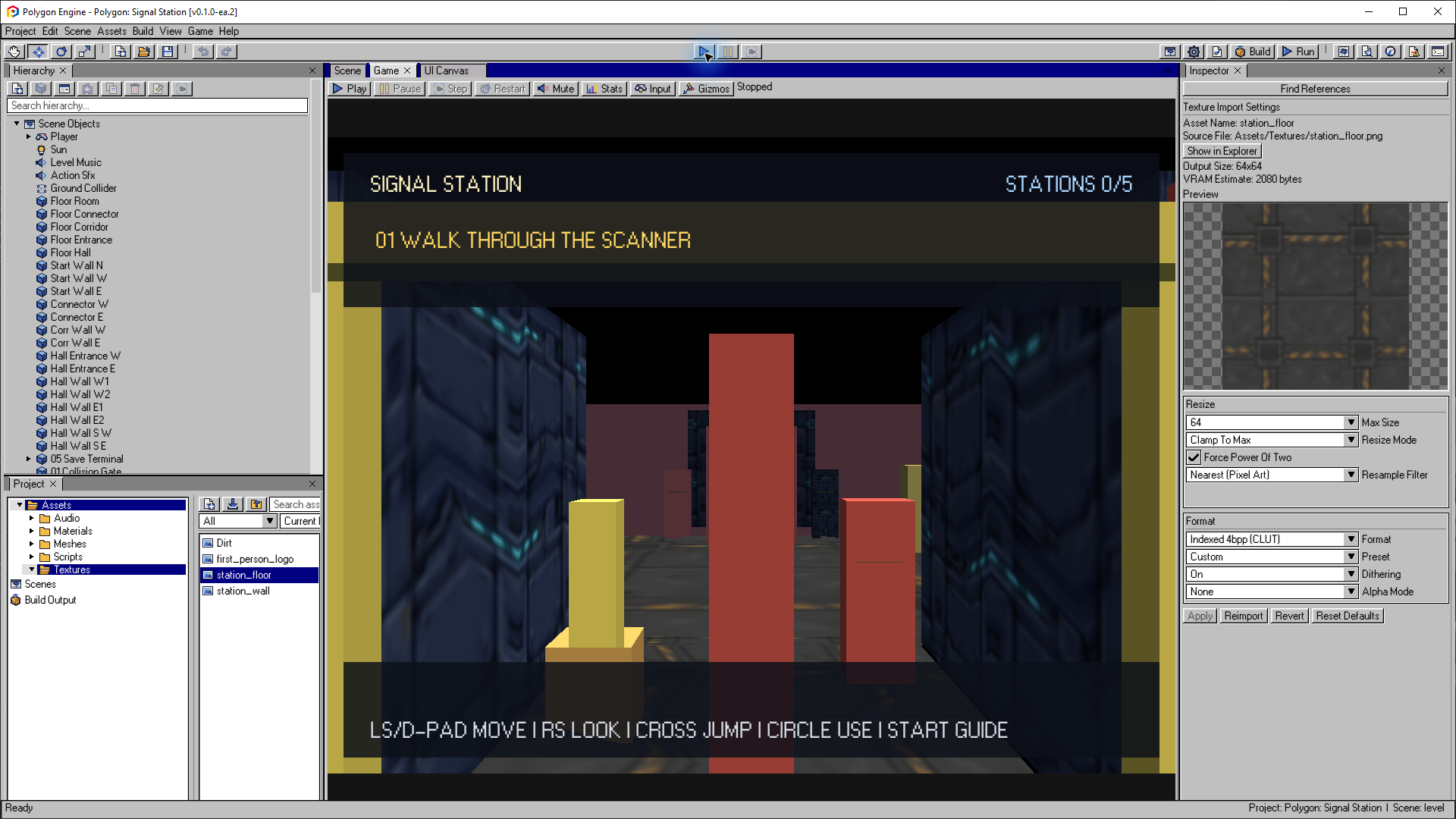
Selecting a source texture in Project opens Texture Import Settings. Preview the output, choose resizing and a PS1 format, then apply or reimport the asset.
Open the image to view it at full size.Import Flow
- Add source files to the right folder under
Assets/, or choose Assets > Import > Multiple Supported Assets... to select a mixed batch of models, textures, WAV audio, and Lua scripts. - Wait for the import queue in Project Browser to finish. Import queued means conversion is pending; check the Inspector and Console for its result.
- Select the source asset to review the preview, output size, compatibility warnings, and import settings in the Inspector.
- If a static model is dense, open PS1 Asset Optimizer, inspect the recommendation, set the target, and generate the runtime copy. Review its silhouette, UVs, scale, and orientation before placing it.
- Select Apply & Import after changing settings, or Reimport after correcting the source file. Apply changes before moving on to another asset.
- Assign the imported asset to a component, material, UI image, or Audio
Source. For long music, enable Streaming Music (CD-XA) and use the
global
MusicLua API instead. - Use Validate Project and PS1 Budget, then test Play Mode and a PS1 build. A successful import checks the asset, not the performance or total memory usage of a complete scene.
Mixed imports use the normal per-type queues and validation. Stop Play Mode and wait for an active build before importing. Play and Build require all queued conversions to finish; press the action again once the queue is empty. Model import and optimization show background progress and support cancellation. Texture and audio conversion do not offer that same cancellation control.
Working in a smaller Inspector
Model, texture, and audio settings scroll inside the Inspector. The action buttons remain below the settings: use Apply & Import to apply your edits, or Reimport to retry conversion. Model placement actions remain in this area too. Buttons wrap onto additional rows when the panel is narrow.
Scroll over the settings to reach every section. Import controls are read-only during Play Mode, a build, or an active model import; stop or finish that operation before editing. If text feels too large, use View > UI Scale or widen the Inspector. Changing the editor scale does not change your game's output resolution.
Import Troubleshooting
| Symptom | What to do |
|---|---|
| A copied source does not appear | Refresh Project Browser with F5, then select the source file. |
| The extension is unsupported | Export a supported format from the source application; renaming the extension does not convert it. |
| The Inspector shows an import error | Read the error, correct the source or settings, then select Reimport. Selecting a failed asset alone does not retry it. |
| A previous preview remains after a failed reimport | The last successful output may still be available. Resolve the error and reimport before relying on the new settings. |
| Import cannot save files | Make sure the project folder is writable and has free space. Close programs that may be locking its files, then retry. |
| Play or Build asks you to wait | Finish or cancel the active model import and let the remaining queued conversions complete. |
Keep the editable sources and their metadata with the project. Do not repair an import by manually editing generated files in Library.
Find References
Select an asset and use Find References in the Inspector before moving or
deleting shared content. The search scans authored scene JSON and material
documents, excludes generated Library/ and Build/ data, and reports the
exact document path for every match.
A report with no matches means the asset is an orphan candidate, not that it is automatically safe to delete. Lua may choose an asset or scene by string, and content outside the supported authored-document scan may still depend on it. Review script usage and source control history before deletion.
For format details, see:
Model Import Settings
Model importer settings appear in the Inspector when a model source is selected.
OBJ and FBX models are converted to .msh runtime assets. An FBX
with Import Hard-Skinned Animation enabled also produces a bounded .skn
asset under Library/animations/. See Skeletal
Animation for the one-weight, one-material path.
External model files selected through the import dialog are copied into
Assets/Models/ by default, or into the selected Assets subfolder. The optimizer never overwrites that source. Its target,
quality, symmetry, and preservation constraints are stored in metadata so
Reimport can reproduce the generated result.
Model optimization and import run in the background with visible progress and cancellation. After generation, compare Source and Generated in the same preview modes. Other imports wait while a model is processing, and project editing is temporarily unavailable until that operation finishes.
Texture Import Settings
Texture importer settings control PS1 format, resizing, resample filter, palette and dithering. Indexed formats reduce artwork to 16 or 256 colors; 16 bpp uses the PS1 direct-color format. Enable dithering for smoother gradients, or leave it off to preserve crisp pixel patterns.
Use Auto for general artwork, Nearest for pixel art and masks, Area for deliberate downscaling, and Mitchell for smooth enlargement. The smooth filters use premultiplied alpha to avoid transparent-edge color bleeding.
Textures are imported into PS1-oriented .tex data and later placed into VRAM by the runtime.
Level Builder Meshes
Level Builder saves editable .pmsh files under Assets/Meshes/ and compiled .msh files under Library/meshes/. See Level Builder.