3. Create the Door Trigger and Lua
The door will open when the player crosses an invisible volume. One Lua script will own the trigger, checkpoint position, persistent door state, UI callbacks, and reset path.
Create the Trigger GameObject
- Select Scene > Create Entity > Create Empty and keep it at the scene root,
separate from
DoorandPlayer. Disabling Door must not disable its controller. - Rename the GameObject
Door Trigger. - Set its Transform Position to
(0, 1.0, -2.25). - In the Inspector, select Add Component > Collider.
- Set Type to AABB and Size to
(1.6, 2.0, 1.0). HoldCtrland click a numeric field to type an exact value, then press Enter. - Enable Is Trigger.
The trigger sits immediately before the door when approaching from Room A. It must overlap the player capsule but must not block movement.
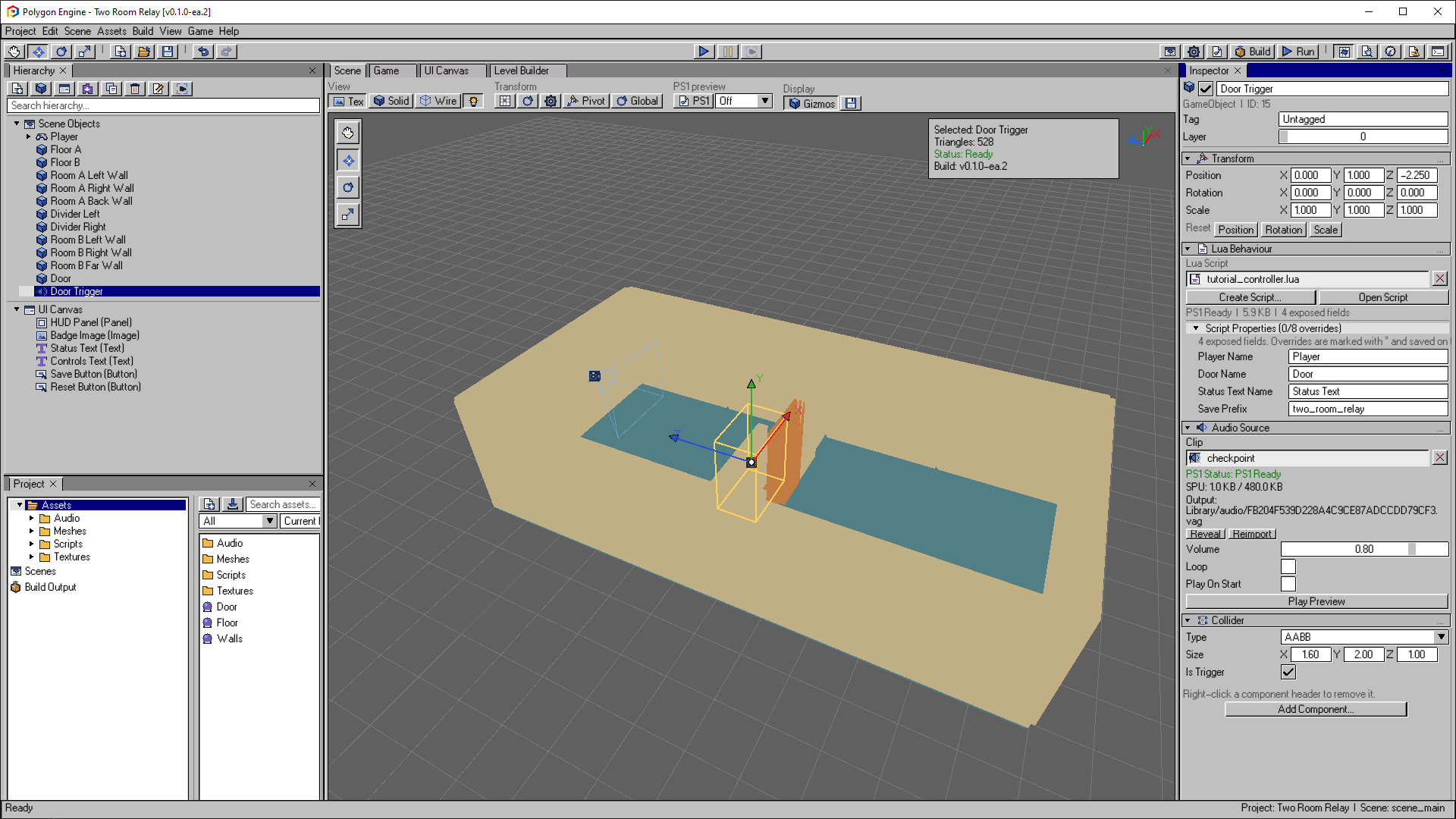
The finished Door Trigger sits on the Room A side of the doorway. The Inspector shows the script name bindings, checkpoint sound and trigger dimensions. Audio is added in the next chapter.
Open the image to view it at full size.Create and Attach the Script
- With
Door Triggerselected, choose Add Component > Lua Behaviour. - The Select Lua Script dialog opens. Select Create New. If you already added an empty Lua Behaviour, its Create Script... button opens the same creation workflow.
- Name it
tutorial_controller.lua, select the Behaviour template, and place it inAssets/Scripts, then select Create. - Select Open Script.
- Replace the generated contents with the code below and save the file.
You can also download the
complete script
and copy it over the generated file at Assets/Scripts/tutorial_controller.lua.
Return to the engine and confirm that the Lua Behaviour shows the script as PS1 Ready.
-- These Inspector properties link the script to the objects you create.
-- Match their names exactly; do not translate or reuse them for other objects.
playerName = "Player"
doorName = "Door"
statusTextName = "Status Text"
-- Group this puzzle's saved values under one prefix. Changing it makes the
-- script look for a different checkpoint; it does not rename existing save keys.
savePrefix = "two_room_relay"

-- Resolve names once in Start and reuse the IDs in later callbacks.
-- The HUD is added in the next chapter, so its ID may still be unavailable.
local playerId = -1
local doorId = -1
local statusId = -1
-- Reset returns here, not to the most recently saved checkpoint.
local startPosition = nil
-- Track the live door separately from saved progress: it can stay open
-- even when the Memory Card is unavailable.
local doorOpen = false
-- These four values are the complete checkpoint for this tutorial.
local fields = { "x", "y", "z", "door_open" }

-- Keep this puzzle's keys separate from other systems using PlayerPrefs.
local function key(name)
    return savePrefix .. "." .. name
end

local function status(message)
    -- Always keep the full diagnostic in the Console, even before the HUD exists.
    Log.Print(message)
    if statusId >= 0 then
        -- Fit the tutorial's ASCII messages into the PS1 text limit: 62 characters
        -- plus one line break. Two 32-character lines fit this HUD's built-in font.
        local display = string.sub(message, 1, 62)
        if #display > 32 then
            display = string.sub(display, 1, 32) .. "\n" .. string.sub(display, 33)
        end
        Text.SetText(statusId, display)
    end
end

-- Stop gameplay/save operations if a name binding points to a missing object.
-- A disabled Door still exists, so an already-open door remains a valid target.
local function valid_targets()
    if not GameObject.Exists(playerId) or not GameObject.Exists(doorId) then
        status("SETUP ERROR: CHECK PLAYER AND DOOR NAMES")
        return false
    end
    return true
end

-- Opening this simple door disables both its mesh and its blocking collider.
-- Door Trigger stays active because it is a separate GameObject.
local function set_door(open)
    if not GameObject.SetActive(doorId, not open) then
        status("SETUP ERROR: DOOR IS UNAVAILABLE")
        return false
    end
    doorOpen = open
    return true
end

-- Keep a copy of only this tutorial's existing values for failed-operation
-- recovery. Preserve their types: coordinates are floats, door_open is an int.
local function capture_preferences()
    local previous = {}
    for _, name in ipairs(fields) do
        if PlayerPrefs.HasKey(key(name)) then
            previous[name] = name == "door_open"
                and PlayerPrefs.GetInt(key(name), 0)
                or PlayerPrefs.GetFloat(key(name), 0.0)
        end
    end
    return previous
end

-- Remove only this puzzle's keys from memory; leave other save data alone.
-- The caller must Save to make a reset persist on the storage device.
local function clear_preferences()
    for _, name in ipairs(fields) do
        -- A missing key returns false, but there is already nothing left to delete.
        PlayerPrefs.DeleteKey(key(name))
    end
end

-- Undo changes in memory after a failed operation. Clear partial additions
-- first so retries do not use an incomplete checkpoint or consume extra entries.
local function restore_preferences(previous)
    clear_preferences()
    for _, name in ipairs(fields) do
        local value = previous[name]
        if value ~= nil then
            if name == "door_open" then
                PlayerPrefs.SetInt(key(name), value)
            else
                PlayerPrefs.SetFloat(key(name), value)
            end
        end
    end
end

local function save_checkpoint(hostId, message)
    if not valid_targets() then return false end
    local position = Transform.GetPosition(playerId)
    if position == nil then
        status("SAVE FAILED: PLAYER IS UNAVAILABLE")
        return false
    end
    -- Prepare the player position and door state as one checkpoint in memory.
    -- Stop adding values on the first failure; do not save a partial set.
    local previous = capture_preferences()
    local written = PlayerPrefs.SetFloat(key("x"), position.x)
        and PlayerPrefs.SetFloat(key("y"), position.y)
        and PlayerPrefs.SetFloat(key("z"), position.z)
        and PlayerPrefs.SetInt(key("door_open"), doorOpen and 1 or 0)
    -- SetFloat/SetInt alone do not persist data. Save writes the shared store
    -- to the editor's local file or the PS1 Memory Card in Port 1.
    if not written or not PlayerPrefs.Save() then
        -- Read the failure reason before restoring values, which makes more save-API
        -- calls. Keep the live door state unchanged so the player can retry with Save.
        local reason = SaveData.GetLastError()
        restore_preferences(previous)
        status("SAVE FAILED - RETRY SAVE: " .. reason)
        return false
    end
    status(message)
    -- Confirm success with the Audio Source on Door Trigger, the script's host.
    -- The next chapter adds this component; no separate audio object is needed.
    AudioSource.Play(hostId)
    return true
end

local function teleport(position)
    if not Transform.SetPosition(playerId, position.x, position.y, position.z) then
        status("LOAD FAILED: INVALID PLAYER POSITION")
        return false
    end
    -- Do not carry a previous fall or jump into the restored position.
    CharacterController.SetVelocityY(playerId, 0.0)
    return true
end

local function load_checkpoint()
    if not valid_targets() then return false end
    local previous = capture_preferences()
    -- Read the last persisted checkpoint, rather than unsaved in-memory edits.
    -- PlayerPrefs and SaveData share the same underlying store.
    if not SaveData.Reload() then
        local reason = SaveData.GetLastError()
        -- Keep the previous tutorial values available if the device cannot be read;
        -- the player and door have not moved or changed yet.
        restore_preferences(previous)
        status("LOAD FAILED: " .. reason)
        return false
    end
    -- Require all four keys before restoring anything. A first run or a successful
    -- Reset has no checkpoint, so leave the current scene state alone.
    for _, name in ipairs(fields) do
        if not PlayerPrefs.HasKey(key(name)) then
            status("NO CHECKPOINT")
            return false
        end
    end
    -- Use an out-of-range fallback for an unreadable coordinate instead of
    -- silently replacing it with a valid position at the origin.
    local position = {
        x = PlayerPrefs.GetFloat(key("x"), 1e30),
        y = PlayerPrefs.GetFloat(key("y"), 1e30),
        z = PlayerPrefs.GetFloat(key("z"), 1e30)
    }
    if not teleport(position) then return false end
    -- Restore the door from the same checkpoint as the player position.
    if not set_door(PlayerPrefs.GetInt(key("door_open"), 0) == 1) then return false end
    status("CHECKPOINT LOADED")
    return true
end

-- Bind the authored objects when this behaviour starts, not on every frame.
-- UI.Find searches UI elements; GameObject.Find searches scene GameObjects.
function Start(gameObjectId)
    statusId = UI.Find(statusTextName)
    playerId = GameObject.Find(playerName)
    doorId = GameObject.Find(doorName)
    if not valid_targets() then return end
    -- Remember the Room A starting position for Reset. Apply the door's saved
    -- state now; Square will restore the saved player position on demand.
    startPosition = Transform.GetPosition(playerId)
    set_door(PlayerPrefs.GetInt(key("door_open"), 0) == 1)
    -- Give controller users an initial UI selection so Cross can activate Save.
    local saveButton = UI.Find("Save Button")
    if saveButton >= 0 then Selectable.Select(saveButton) end
    status(doorOpen and "DOOR OPEN - SQUARE LOADS" or "WALK TO THE DOOR")
end

-- Load once per Square press, not every frame while the button is held.
-- Repeated storage reads would stall gameplay.
function Update(gameObjectId, dt)
    if Input.GetButtonDown(Input.SQUARE) then load_checkpoint() end
end

function OnTriggerEnter(gameObjectId, otherGameObjectId)
    -- Only the player can solve the door trigger, and entering it again after
    -- opening must not keep overwriting the checkpoint.
    if otherGameObjectId ~= playerId or doorOpen then return end
    if not valid_targets() or not set_door(true) then return end
    -- Open the passage before trying to save: a missing card must not block Room B.
    -- The Save button can retry with the open door and the current player position.
    save_checkpoint(gameObjectId, "DOOR OPEN - CHECKPOINT SAVED")
end

-- The Save Button calls this through its Target Entity and Function fields.
-- gameObjectId identifies Door Trigger, not the UI button that sent the event.
function saveNow(gameObjectId, elementId, elementName, eventName)
    save_checkpoint(gameObjectId, "CHECKPOINT SAVED")
end

-- The Reset Button clears only this tutorial's progress. Keep the scene
-- unchanged until that reset has actually been saved.
function resetProgress(gameObjectId, elementId, elementName, eventName)
    if not valid_targets() or startPosition == nil then return end
    local previous = capture_preferences()
    clear_preferences()
    if not PlayerPrefs.Save() then
        -- Capture the error before rollback so the message explains why Reset failed.
        local reason = SaveData.GetLastError()
        restore_preferences(previous)
        status("RESET FAILED: " .. reason)
        return
    end
    -- Return to Room A before closing the door, so Reset cannot trap the player.
    if not teleport(startPosition) then return end
    if not set_door(false) then return end
    status("PROGRESS RESET")
end
Connect the Script Properties
Return to Polygon Engine and select Door Trigger. The Lua Behaviour component reads
the top-level declarations before the first function and exposes them under
Script Properties.
Set:
| Script property | Value |
|---|---|
| Player Name | Player |
| Door Name | Door |
| Status Text Name | Status Text |
| Save Prefix | two_room_relay |
The script resolves these exact, unique names once in Start and caches their
IDs. Keep both objects enabled in the authored scene; Start applies the saved
door state after binding the references.
A missing name produces a setup error instead of silently disabling the puzzle.
An asterisk in the Inspector means the GameObject overrides the Lua default.
What the Script Does
Startrestores the saved door state.OnTriggerEnterchecks that the entering GameObject is the player, opens the door, saves the checkpoint, and flushes it.Updateexplicitly reloads the persisted document before loading on Square.- A failed save preserves the previous tutorial preferences in RAM, keeps the live door open, and offers retry through Save. A failed reset keeps the live door/player state unchanged. A successful reset returns the player to Room A.
saveNowandresetProgressare callbacks for authored UI buttons.AudioSource.Play(hostId)will use the trigger's Audio Source after the next chapter adds it.
Checkpoint 3
Press Ctrl+S and enter Play Mode. Walk toward the door. The door should
disappear and allow entry into Room B. The Console must not report a missing
script, setup or trigger error. The initial save can fail if no writable save device
is available; the door still opens, and the next chapter adds visible feedback.
The status text and audio do not exist yet, so their visible feedback comes in the next chapter: Add UI, Audio, and Saving.