Building PS1 Levels with Level Builder
Beyond drawing models, Polygon Engine needed tools for building spaces a player could walk through. A simple room brings together several problems I wanted to solve: floors seen in perspective, walls close to the camera, doorways, and collision that lets the character move without passing through the geometry.
Working with that kind of space helped me connect rendering to level editing. Changing a wall's size or the shape of an entrance also meant considering how it would look on PS1 and what collision volume it needed. Level Builder is part of that process of creating and reviewing the level.
Testing movement through a level
To review a test room, I find it useful to define a simple route before adding detail: enter, look at the floor, approach a corner, pass through a doorway, and turn around. These are ordinary movements during play, but each reveals a different part of the level's behavior.
Looking down makes floor mapping easier to inspect. Approaching a wall checks geometry near the camera, while passing through a doorway checks collision. Walking back along the same route can also reveal surfaces that only show problems from certain angles.
I wanted to make those adjustments through the operations I knew from Unity: select, move, rotate, scale, and assign components. The difference was preparing the result for PS1. A large plane can be convenient for building a floor, for example, but may need subdivision to improve its texture mapping up close.
Choosing where to subdivide geometry
A long corridor floor can be built from just two triangles. That keeps the geometry count low, although the texture may distort significantly when the camera is close to the ground and the surface extends into the distance.
Breaking the floor into shorter sections can reduce affine texture distortion and give the ordering process smaller surfaces to work with. But a dense grid has a real cost. It increases transformed vertices, generated packets, and sorting work. If the player can see many sections at once, the budget changes again.
I prefer to adjust subdivision according to each surface's size and position. A nearby floor occupies far more screen space than a distant decorative panel. A wall seen at an angle may need a different treatment. Reviewing the level through the player's camera helps me decide where extra triangles improve the image enough to justify their cost.
Adjacent pieces also need to agree at their boundaries. Careless splitting can introduce cracks or mismatched edges. The renderer and the authoring tool have to share assumptions about how positions are represented and how geometry is prepared.
Matching collision to the visible level
Adding movement also means reviewing collision volumes. The mesh defines the appearance of a wall or doorway; collision determines where the character can move. The two representations need to agree where they affect the player's route, even if they use different levels of detail.
A door frame might contain decorative bevels, inset panels, and a complicated silhouette. None of those details automatically justify equally complicated collision. A simpler arrangement can provide predictable movement and cost less to query. On the other hand, simplifying too aggressively can make an opening look passable while an invisible barrier blocks it.
In first person, a mismatch between a visible opening and its collision is immediately noticeable: the character appears to fit but cannot pass through. Avoiding that means reviewing the opening's dimensions, controller shape, step height, and collider placement together.
In Polygon Engine, collision is configured through components, so it can be adjusted separately from the mesh. This lets the visual geometry keep its detail while using simpler collision shapes where they are sufficient. It also lets the user decide which parts of a level should block movement or act as triggers.
Mesh editing in Level Builder
Level Builder brings mesh editing tools into the editor. It supports working with vertices, edges, faces, and UVs, then saving the result as an asset for the scene. I wanted users to build and adjust a room without switching applications for every geometry change.
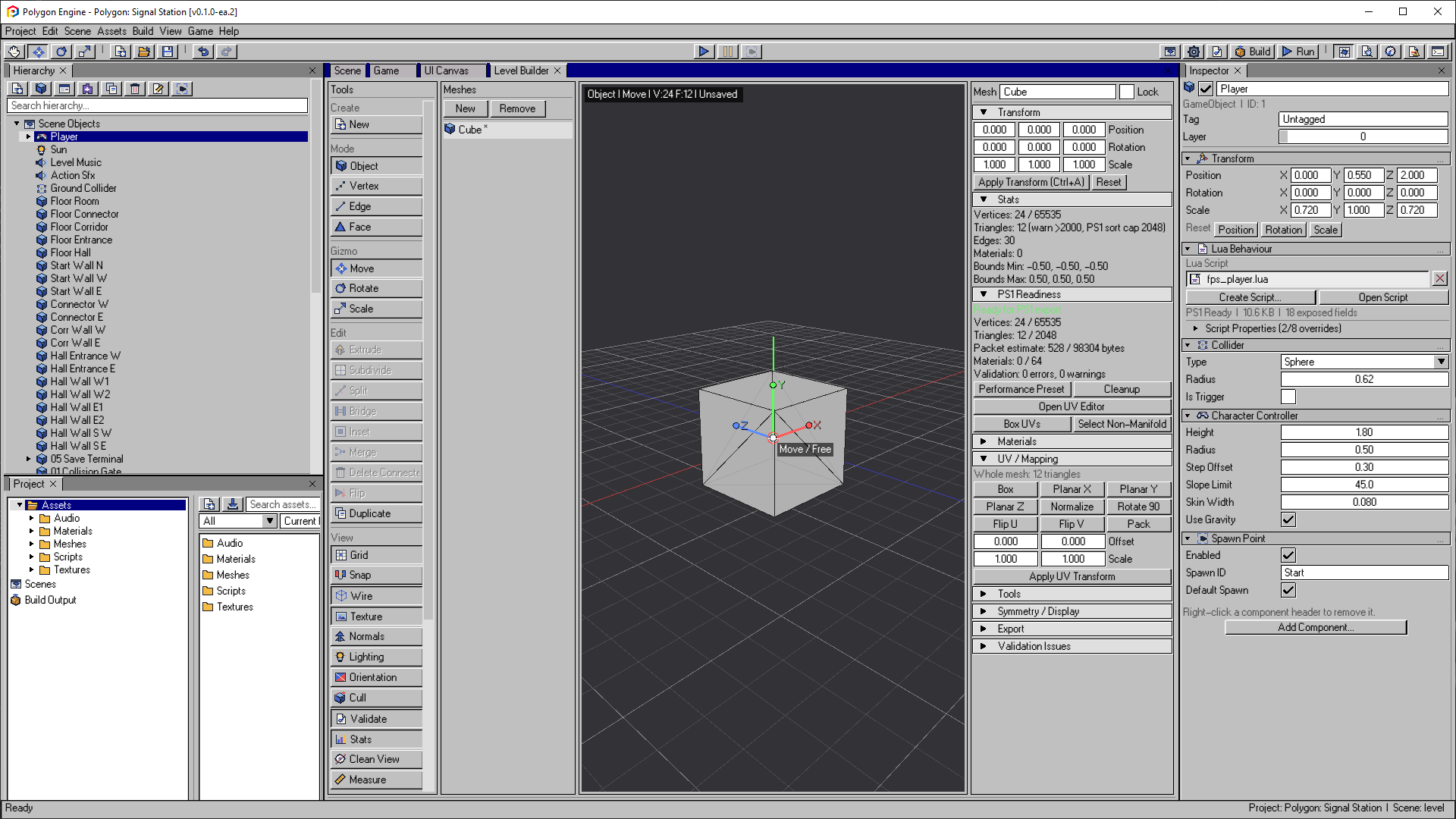
Level Builder in the documented editor version. This later capture illustrates the workflow discussed here; it is not a historical screenshot from the post date.
Open the image to view it at full size.It is useful to see the mesh's limits during editing. Reviewing one asset, however, does not establish the cost of a complete scene: placing several copies increases rendering work. That is why Level Builder's statistics need to be considered alongside the project budget.
The Level Builder guide explains the available controls. When integrating them, I wanted editing to be comfortable and to provide enough information to review the result before export. Creating a shape quickly is useful, but I also need to understand how it will affect the game.
Working with a small test level
For these checks, I prefer a small test level that is easy to modify. I can change the floor sections, lower the camera, remove a texture, or simplify a collider and compare the result. In a more elaborate scene, it becomes harder to identify which change explains the difference.
This also explains why a compact tutorial can teach more than a large showcase. Two rooms and a door create enough structure to exercise movement, visibility, interaction, and scene organization while remaining small enough to understand.
These tests let me check the complete process: modify the room, save it, reopen it, and export it. Geometry, materials, and collision need to preserve the adjustments I made. That lets me continue building the level without repeating work on every build.