Controller Input and Memory Card Saves
While working on gameplay interactions, I needed controller input to behave consistently across scripts and the interface. Players also needed to save progress and recover it in another session. Both systems are used constantly, but require considering more situations than the usual setup on my development computer.
A player may start without a connected controller or use one with different capabilities. A memory card may be full, missing, or contain damaged data. Integrating these systems into Polygon Engine meant accounting for those cases and providing enough information for each game to respond to them.
Reading button presses and releases
Implementing input required distinguishing a held button from a new press. The first comes from the current state; the second requires comparing it with the previous state. That comparison must produce the same result for every system querying input during an update.
For example, if a script queries the confirm button and the interface then queries it too, both need information from the same controller reading. If each query also advances the previous state, the result can change according to system execution order.
The device therefore needs to be sampled at a defined point in the update, retaining the previous state for comparisons. Scripts can then distinguish a press, a hold, and a release without changing the reading other systems receive.
Controller communication also includes details the API needs to handle, such as device identification and active-low bits, where zero indicates a pressed button. The controller and memory-card reference explains the protocol. Understanding it lets me offer straightforward Lua queries without requiring every script to handle those details.
Digital and analog controllers
Digital and analog controllers do not provide the same information. Connecting a desktop gamepad through the operating system also uses a different path from communicating with a PS1 controller. Interpreting the values correctly requires knowing the device type and its current mode.
Sticks also need a dead zone. If it is too small, a stick resting slightly off center can move the character or camera unintentionally. If it is too large, small movements become difficult. Adjusting it and normalizing the values makes input easier to use in gameplay.
The keyboard makes quick editor checks convenient, but controller interactions need their own testing. A key cannot reproduce a stick's range, and a desktop test does not check PS1 controller communication. The same action should be tested with the devices and environments the game targets.
Coordinating gameplay and menu input
Input consistency alone does not decide who should react. If a menu is open, the same button press should not accidentally confirm a UI choice and activate a door behind it.
To prevent this, the game needs to define when movement, interaction, or menu navigation is active. The engine provides input and UI mechanisms, while scripts coordinate their use according to the current game state.
A small project combining movement, interaction, and an interface makes that coordination easier to review. Testing them together can reveal whether an action still reaches the character when the menu should handle it, something an isolated movement-script test would miss.
Checking whether a save succeeded
With saving, the first distinction is between updating session data and writing it to the card. In Polygon Engine, setting a PlayerPrefs value changes data in memory. Saving it requires an explicit operation and a check of its result.
The interface needs to reflect that difference. Opening a door can update the current game's progress, but the saved message should appear only after the write succeeds. Showing it earlier could lead the player to close the game believing their progress has already been stored.
I prefer a flow that keeps the current progress available if writing fails, explains the failure in useful terms, and offers a retry. Loading also needs a result check before applying saved state. Otherwise, a failed read can turn into an unrelated-looking problem such as moving the player to the wrong checkpoint.
The persistence guide describes the actual APIs. The principle behind them is simple: a game's feedback should correspond to the operation that really succeeded.
Choosing which progress to save
A standard PS1 memory card has 128 KiB arranged into sixteen 8 KiB blocks, with one reserved for system structures. Polygon Engine's current save store uses one game block and a bounded set of entries. Within that space, I need to choose the data required to reconstruct progress when loading a game.
For a simple interaction, a checkpoint identifier and a door state may be enough. This avoids copying every property of every object, many of which are already restored by loading the scene. Besides taking less space, those values are easier to maintain when the level changes.
The save-file identity also needs attention so two projects do not accidentally use the same one. Values must fit the supported encoding and length limits, and a change in their structure requires deciding how to read earlier saves. A small file still has those requirements.
Testing missing, full, and damaged cards
Save Data Simulator lets me test missing, full, or damaged cards from the editor. It helps me review the message players receive, whether they can retry, and whether their session progress remains available while the problem is resolved.
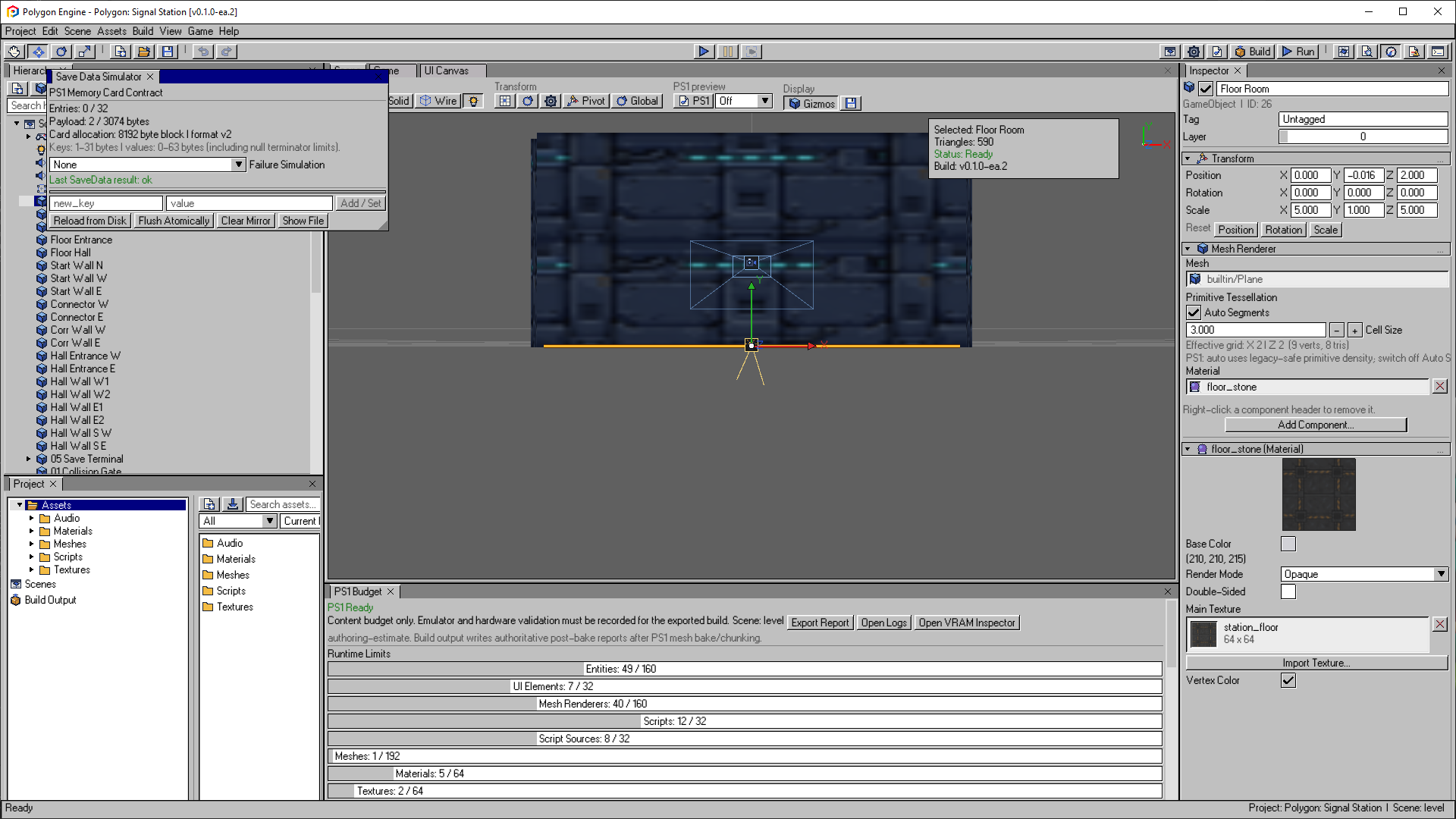
Save Data Simulator in the documented editor version, illustrating the failure-testing workflow rather than a physical memory-card test.
Open the image to view it at full size.These tests help review the game's response, but simulation cannot reproduce every physical card failure or power interruption. Evaluating those cases requires additional emulator and hardware tests. Each environment checks a different part of the behavior.
Working on input and saving has made me pay closer attention to what happens between an action and its confirmation. The game needs to respond once per press where appropriate, menus need to avoid triggering other interactions, and save messages need to match the result. Those details are best tested as part of a complete play session.