Memory, Textures, and Palettes on PlayStation 1
While studying PlayStation 1 memory for asset importing, I had to separate three things: game data, graphics, and sound. Each uses a different memory region, so calculating the total size of a scene was not enough.
A scene can leave space in main RAM and still exceed VRAM capacity with its textures. Resident sounds have a separate limit as well. Understanding that separation helped me decide what the engine needed to show when reviewing assets before export.
Main RAM, VRAM, and sound RAM
The original PS1 has 2 MiB of main RAM, 1 MiB of VRAM, and 512 KiB of SPU RAM. I use MiB and KiB here for precise quantities: a KiB is 1,024 bytes. With this little memory available, it helps to keep the units consistent when calculating usage.
Main RAM holds the program and much of its working data. VRAM holds display buffers, textures, and palettes. SPU RAM holds sound data and the space needed by features such as reverb. They are not interchangeable sections of one general-purpose pool. The PS1 memory map is a useful reference for keeping those regions distinct.
The editor needed to show usage for each region separately. That makes it possible to identify which resource is approaching its limit and which change could help. Reducing Lua memory usage, for example, does not free VRAM for a texture, because those data are stored in different regions.
Memory used by the framebuffers
Before adding a texture, the display itself needs storage. Take a common example: a 320 × 240 image stored at two bytes per pixel. One buffer uses 153,600 bytes, or 150 KiB. Keeping two such buffers uses 300 KiB.
That leaves 724 KiB out of the original 1,024 KiB, before considering palettes, other allocations, and placement constraints. It is an illustrative configuration, not a universal PS1 layout: display modes and buffering strategies can change it.
This connects the display resolution to the number of textures that can remain loaded. A larger framebuffer leaves less space for them. Choosing a resolution therefore also means considering whether images need to be smaller or different sets need to be loaded for different areas.
Working through these numbers helped me see why resolution belongs in content planning. Before importing a level's textures, I can already estimate how much space the framebuffers will use and how much will remain for other graphics.
Texture dimensions and color formats
A texture's dimensions do not fully describe its storage. A 256 × 256 image has 65,536 texels, but the number of bits used per texel changes the cost dramatically.
| Texture representation | Image data | Palette data |
|---|---|---|
| 4-bit indexed | 32 KiB | 32 bytes for 16 entries |
| 8-bit indexed | 64 KiB | 512 bytes for 256 entries |
| 16-bit storage | 128 KiB | No indexed palette |
The table gives the sizes of the image and palette data. Actual placement in VRAM also depends on positioning and alignment rules. The 16-bit format includes a GPU control bit, so it does not provide sixteen bits dedicated entirely to RGB color.
With an indexed image, a texel selects an entry in a color lookup table, or CLUT. That is why a palette is more than an import option. It is another piece of graphics data that must be placed and referenced correctly. The GPU reference describes these texture modes and addressing rules.
For an industrial corridor, a well-chosen 16-color palette may be enough to distinguish metal, grime, and warning paint. Direct color uses four times as much image storage, so it is worth comparing the result at the game's resolution before choosing it. The palette affects both the resource size and its appearance.
Placing textures in VRAM
VRAM is organized as a surface of 1024 × 512 16-bit words. Alongside the number of bytes a texture uses, I need to know where it can be placed on that surface.
Texture pages define addressing regions within that surface. Because one word can store four 4-bit texels, a 256-texel-wide texture occupies fewer words in that format than in 16-bit storage. Page positions, palette alignment, and rectangles already in use determine where each asset can go.
The remaining gaps can add up to enough space for another texture without providing a continuous region where it fits. This is a placement problem: adding up the available bytes does not always tell me whether a new image can be stored correctly.
That made a visual layout useful to me. VRAM Inspector connects an imported texture to the region it occupies and shows what is using the surrounding space. With that information, I can decide whether to reduce an image, change its color mode, or keep fewer assets loaded together.
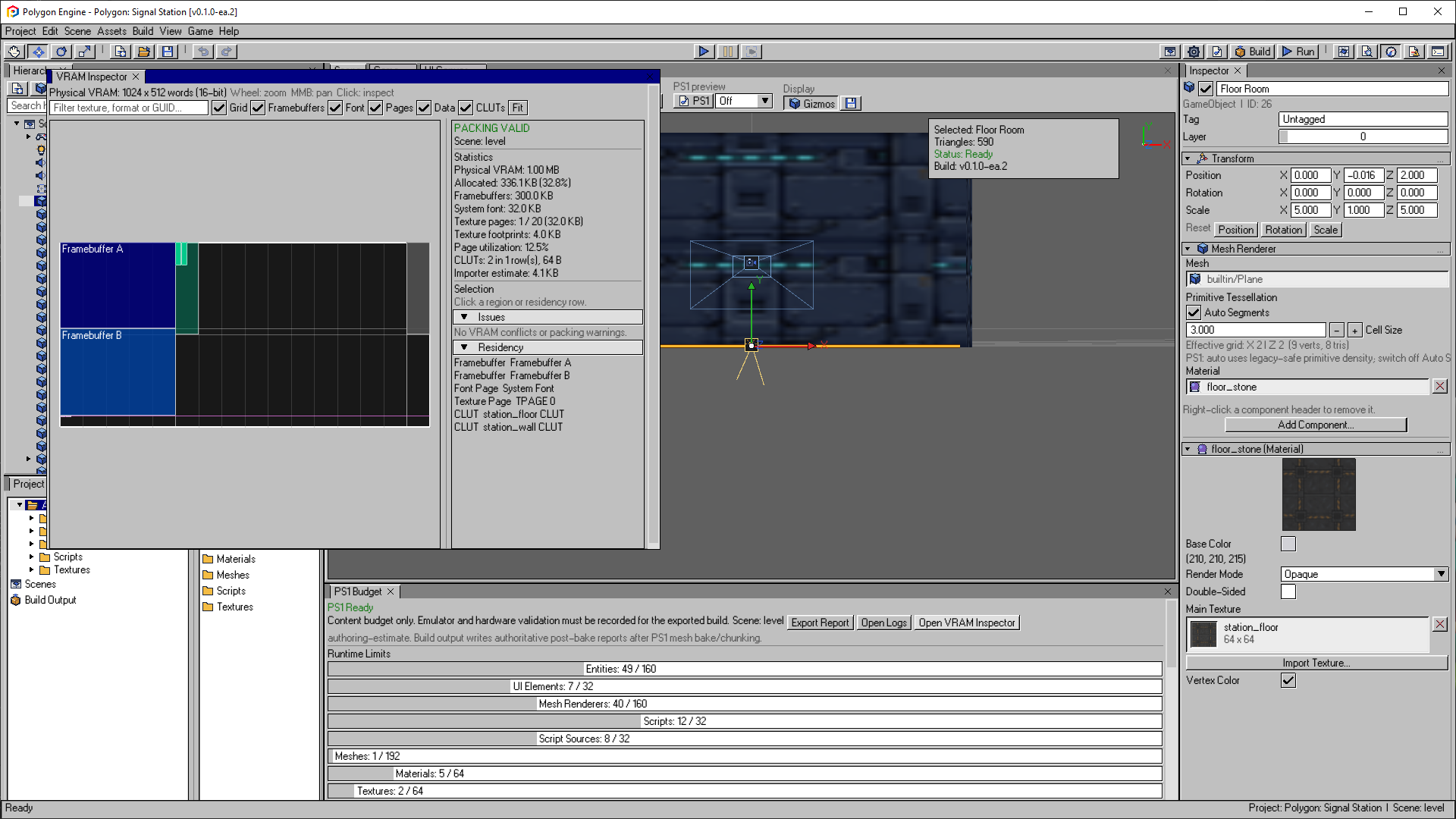
A later editor capture makes the shared layout visible: framebuffers occupy large regions before textures and palettes are added. The values belong to this example project.
Open the image to view it at full size.Planning the textures for a room
When planning a room's textures, I find it useful to start with its main elements: walls, floor, door, props, and interface. From there, I can review which images repeat, which might share a palette, and which need unique detail. Format choices can then be based on a specific set of assets.
The danger is optimizing the least visible thing while ignoring the overall layout. Saving a few palette bytes will not compensate for an unnecessary large texture. Conversely, making every image tiny can damage readability without fixing poor placement.
Understanding the relationship between assets and their placement helped shape the import tools. I wanted to inspect a scene visually and, in the same project, check how much space its graphics used and how they were arranged. That information gives me a concrete basis for adjusting the content.